Meet Your New Smarter, More Efficient Workflow
For machine developers and advanced users, machine definitions are the foundation of accurate machine simulation, kinematic validation, and post-processing. As machines become more sophisticated, the tools for building and maintaining machine definitions need to evolve alongside them.
With the introduction of a modernized Machine Definition Manager, Mastercam 2027 reimagines how users create, edit, and manage machine kinematics. Replacing many legacy popup dialogs with intuitive panel-based workflows and graphics-area interaction, this update brings a cleaner, more efficient experience while laying the groundwork for future machine definition innovations.
A Modern Approach to Machine Definition Management
Accessible from the Machine tab within the Job Setup section, the new Machine Definition workflow places key tools directly on the ribbon. Machine Definition, Control Definition, and Component Libraries are now available through convenient drop-down ribbon buttons, providing quicker access and reducing the need to navigate through multiple modal dialogs.
The result is a more streamlined workflow that feels more integrated with the rest of the Mastercam experience.
Key advantages include:
- A modern, panel-based interface integrated with the graphics window
- Improved visibility into machine components and kinematics
- Reduced reliance on legacy popup dialogs
- Better workflow consistency across machine-related tools
- A scalable framework designed to support future enhancements
Greater Confidence with Local and Global Definition Separation
One of the most impactful improvements in Mastercam 2027 is the clear distinction between local and global machine data.
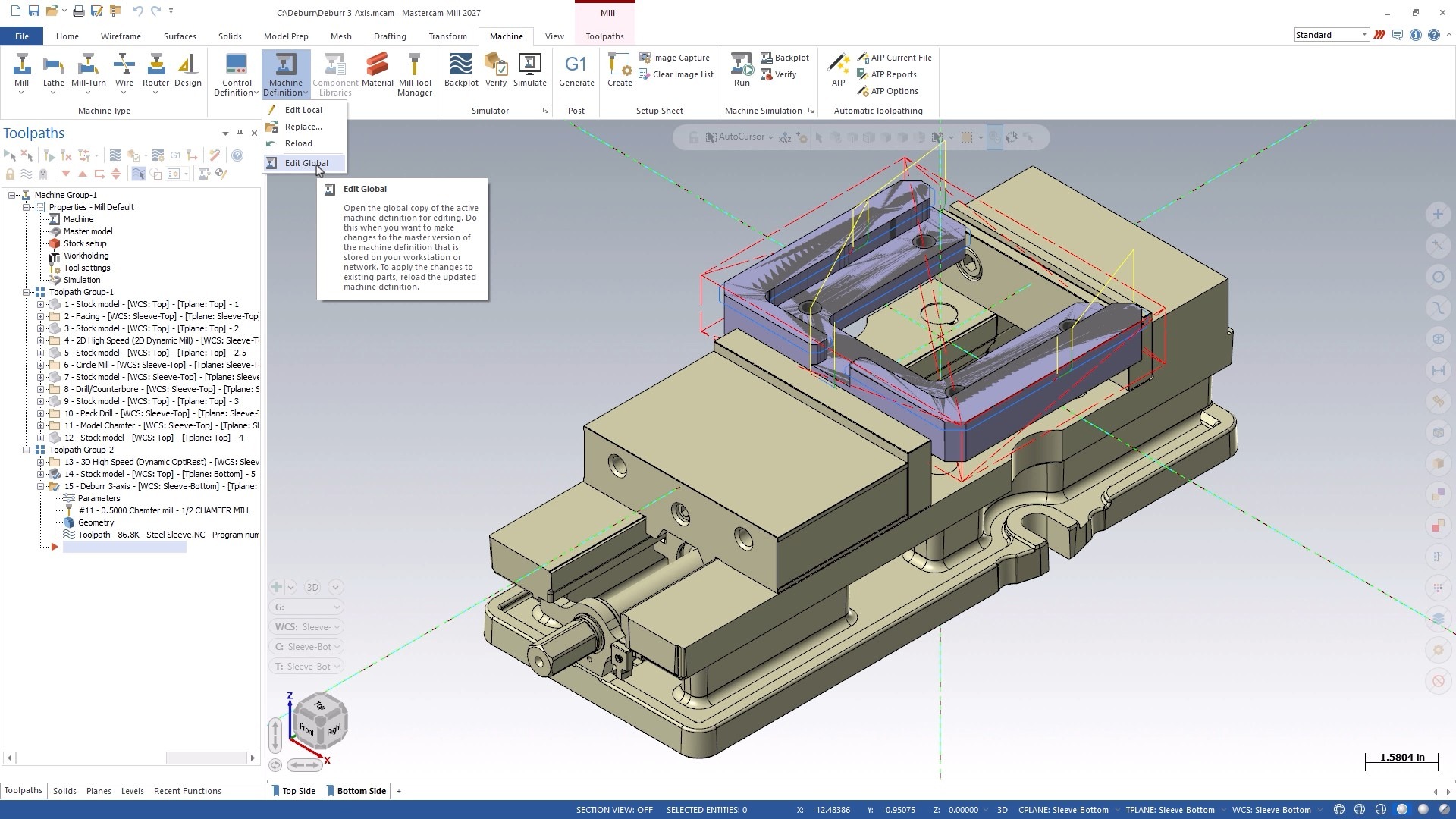
In previous workflows, users could unintentionally modify global machine definitions when making changes for a specific project. The updated workflow helps eliminate that risk.
Now:
- Local machine definitions are stored directly within the part file
- Global machine and control definitions open in a separate Mastercam instance
- Global updates are only applied to local definitions when users explicitly reload them
This separation gives users better control over their machine data and significantly reduces the likelihood of unintended edits affecting multiple projects.
New Panels Replace Legacy Dialogs
At the heart of the modernization effort is an entirely new panel-based editing experience.
The updated panels replace many traditional dialog boxes with a more organized workspace that remains visible alongside the graphics window. Integrated save controls, confirmation options, and cancellation workflows help users stay focused while maintaining full control over their changes.
Additional benefits include:
- Context-sensitive tabs that adapt to machine type
- Integrated Save and Save As functionality
- Streamlined approval and cancellation workflows
- Improved visibility of machine settings while editing
The result is a more intuitive environment for building and maintaining machine definitions.
Improved Kinematic Tree and Graphics Integration
Mastercam 2027 also introduces significant enhancements to the kinematic tree.
The updated tree and graphics window work together seamlessly, allowing users to better visualize machine structure and relationships as they build and modify definitions.
Highlights include:
- Context-aware component and group creation
- Validation of component relationships
- Full synchronization between the kinematic tree and graphics window
- Integrated visibility controls directly within the tree
- Contextual actions available where they’re needed
- Component properties displayed without requiring full edit mode
This tighter integration helps users understand machine behavior more clearly and work more efficiently.
Real-Time Axis Combination Validation
Creating accurate machine kinematics often depends on defining valid axis combinations. Mastercam 2027 introduces built-in validation to help ensure machine configurations are correct before they are saved.
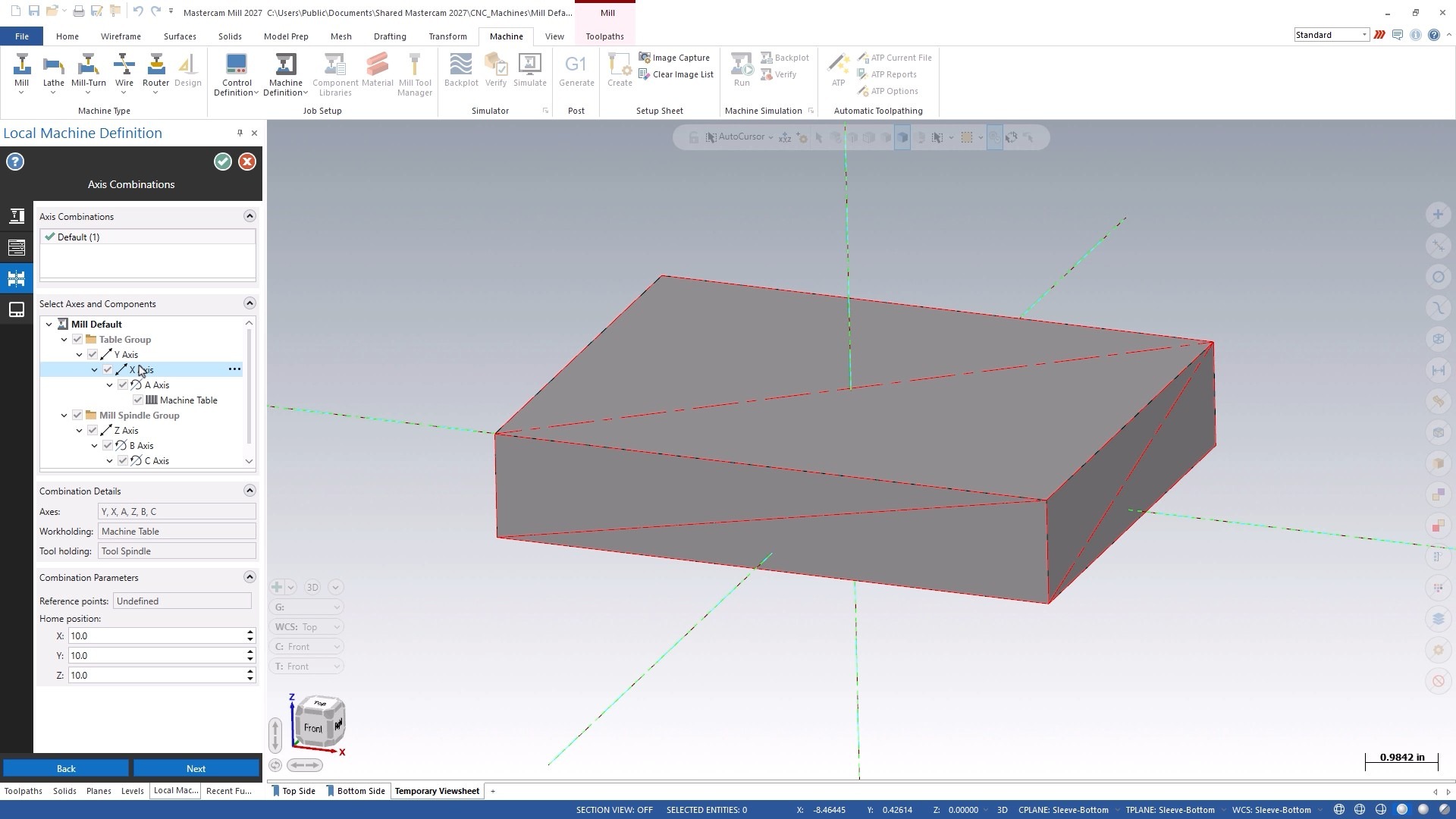
As users build machine definitions, Mastercam 2027:
- Validates axis combinations in real time
- Displays visual indicators for valid and invalid configurations
- Prevents saving until issues have been corrected
This proactive validation helps eliminate errors earlier in the process and increases confidence in machine setup accuracy.
Enhanced File Protection and Security Controls
To better protect machine development work, Mastercam 2027 includes updated password protection features directly within the Machine tab.
New capabilities include:
- Dedicated File Protection controls
- Optional read-only mode for password-protected machine definitions
- Clear visibility into protection status
- Simplified management of security settings
These enhancements make it easier for organizations to safeguard validated machine definitions while still enabling collaboration.
New Component Libraries and Load Components Workflow
Mastercam 2027 also introduces a new approach to working with machine components through Component Libraries and the new Load Components panel.
A dedicated ribbon button now provides direct access to component libraries, which open in a separate Mastercam instance to maintain workflow separation.
The new Load Components panel serves as a common experience across both Machine Definition and Component Library workflows. When users select Load Component from File, the panel provides a consistent method for bringing components into their machine definitions or library environments.
Additional capabilities include:
- Centralized component loading workflows
- Support for both machine definitions and component libraries
- Separate editing environments for improved control
- Future-ready drag-and-drop component loading and geometry preview functionality (work in progress)
By creating a unified loading experience, Mastercam simplifies component management while supporting more advanced workflows in future releases.
Better Workflow Control Without Losing Context
Mastercam 2027 also introduces thoughtful workflow improvements designed to reduce confusion and increase productivity.
While definition panels are open, geometry creation is temporarily disabled to avoid conflicts. Users can close panels, work on geometry, and reopen the panels without losing their place in the workflow.
Clear messaging throughout the process helps users understand the current state of files and editing sessions, making it easier to move between tasks confidently.
Building the Foundation for What Comes Next
For users responsible for creating, maintaining, and validating machine definitions, Mastercam 2027 offers a smarter, more intuitive way to work, bringing greater accuracy, efficiency, and confidence to every project.
Download Mastercam 2027 today or speak with your local Mastercam Representative to learn more!