Every machinist knows the frustration: you have programmed a complex 5-axis part with millions of toolpath points, and now you are staring at a simulation progress bar that barely moves. Your workstation is tied up, deadlines are approaching, and you are left wondering whether the lower resolution simulation you had to run will catch every gouge.
This bottleneck is common in shops everywhere. Traditional CPU based simulation often forces programmers into a compromise: lower accuracy for speed — or higher accuracy with long wait times.
But now there is a better way.
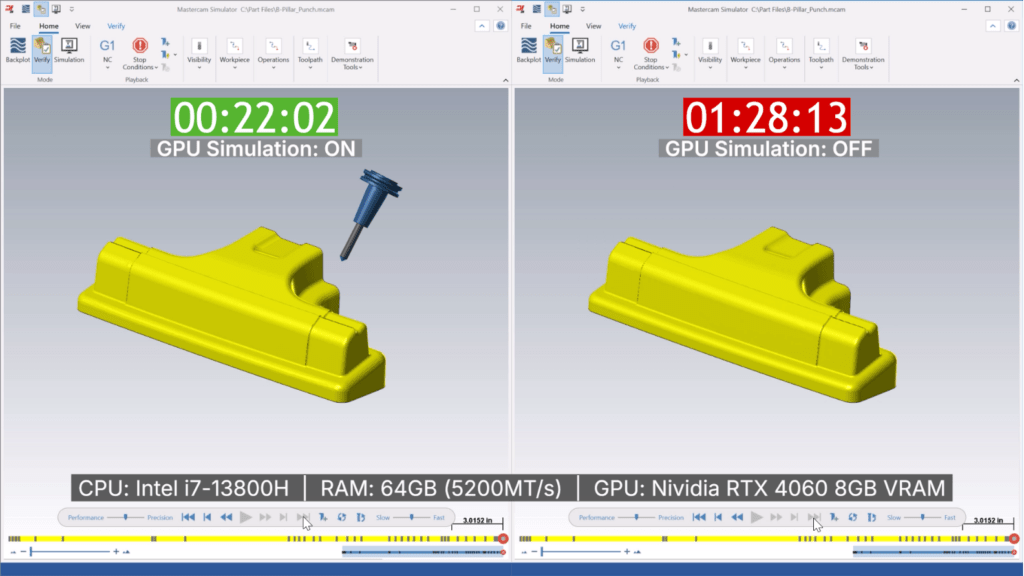
Mastercam 2026.R2 introduces GPU accelerated Simulation and Verification, delivering dramatically faster processing for supported milling workflows. With the right GPU, you can see performance increases of up to 10× compared to CPU based simulation, letting you verify complex toolpaths with far less waiting.
The Hidden Slowdown in Programming Departments
Traditional CPU simulations create constraints that affect your entire operation:
The Accuracy Tradeoff
Simulating millions of toolpath points demands significant CPU resources. To get results sooner, programmers often reduce simulation resolution — but doing so increases the risk of missing subtle collisions or inefficiencies.
Hours Lost to Waiting
Large 3- and 5-axis milling toolpaths can tie up a workstation for hours. That delays programming, stalls iterations, and slows down the entire job.
Hesitation to Innovate
When verification is slow, programmers avoid experimenting with optimal strategies. Potential cycle time reductions go unexplored because simulation simply takes too long.
GPU Simulation: Faster, Smarter Verification for Milling
Mastercam’s GPU accelerated simulation fundamentally changes what is possible for supported milling workflows. By utilizing the massive parallel processing power of modern graphics cards, Mastercam can process material removal and collision detection much more efficiently.
Here is what makes the difference:
- Parallel computation optimized through Vulkan 1.3
- Discrete texel modeling for precise material removal
- Realtime performance gains when Tool vs. Stock collision detection is enabled
With a compatible GPU, simulations that previously took hours may now finish in minutes — even at full resolution.
Real World Impact
Take a typical multiaxis aerospace component:
- Traditional CPU simulation: 3–4 hours at practical resolution
- GPU accelerated simulation: Often 15–20 minutes at maximum resolution (depending on hardware and setup)
Time saved per part: 2.5+ hours
Annual impact: Hundreds of hours returned to programming and process optimization
How Faster Simulation Transforms Your Workflow
Beyond time savings, the benefits change how programmers work:
Iterate More Without the Penalty
Try multiple strategies, test different tool motions, and experiment with optimizations without waiting all day for results.
Verify with Greater Confidence
Full resolution simulations become practical for everyday work, helping catch tool/stock issues that might slip through lower detail runs.
Improve Quoting Responsiveness
Faster verification makes it easier to present accurate machining estimates during customer discussions.
Built Into Mastercam 2026.R2 — With Clear Requirements
GPU Simulation is native to Mastercam 2026.R2 and works within both Machine Simulation (external post) and Mastercam Simulator. You will need:
A compatible GPU (recommended):
- NVIDIA GeForce RTX 3060 (12 GB) or
- AMD Radeon RX 7800 XT
Plus:
- Vulkan 1.3 support
- Sufficient VRAM (12 GB recommended)
Upcoming Webinar: Mastercam 2026.R2 Deep Dive
Mastercam 2026.R2 will be released on February 9th. Make sure you are up-to-date on maintenance to get the free update. Join us for a live webinar to learn more about the latest release. Register here.