Machine simulation creates a virtual representation of a CAM program that mirrors exactly what will happen on the CNC machine. Basically, it creates a model of the cutting process that users can follow in real-time. It shows the workpiece, tools, and fixtures as well as how they interact with each other, highlighting any points at which a mistake will be made. This blog will walk you through the three biggest benefits to using machine simulation when you program your CNC parts.
Expérimenter différentes stratégies de fabrication pour trouver le processus le plus efficace.
Grâce à la simulation de machine, il n’est pas nécessaire d’immobiliser une machine ou de gaspiller du matériel pour effectuer des essais. Les utilisateurs peuvent déterminer quelle approche d’usinage permet d’obtenir les pièces les plus rapides et de la meilleure qualité en cliquant simplement sur quelques boutons.
La première chose que les simulateurs doivent analyser dans leur simulation est leur montage. Y a-t-il une redondance ? Cette option est-elle la meilleure pour cette pièce particulière ? Existe-t-il un moyen de modifier le montage de manière à éliminer une ou plusieurs configurations ?
After they decide on a fixture, they can then break down their code. In almost any program, there is room for improvement. Often, multiple toolpaths can be rolled into one. Consider Dynamic OptiRough. It replaces multiple roughing approaches by optimizing feeds, speeds, and angles to remove the most material quickly and safely. Sometimes you need a completely new machining strategy. For a part that requires a long list of setups, a programmer can play around with 3+2 machining. This approach is a stepping-stone to multiaxis machining and can cut cycle times dramatically. In any case, the user is able to create and apply new approaches – no matter how wild – and see exactly how they will play out without endangering anything.

Détecter les collisions entre le stock, l’outil et les composants de la machine.
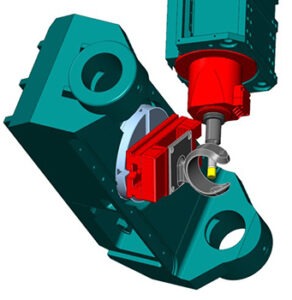
Mastercam Simulation features analyze stock material, heads, turrets, tables, spindles, cutting tools, tool changers, and fixtures during every step of the planned machining. It takes all of the carefully curated data on each component and uses it to precisely map where every single one will be. By now, you know how important it is to avoid machine crashes. But this Simulation package takes it a step further by also checking for collisions to the stock and fixturing components. Even a part with the loosest tolerances becomes useless if a programming error gouges it during machining.
Trouvez les erreurs dans votre code, pas dans la machine
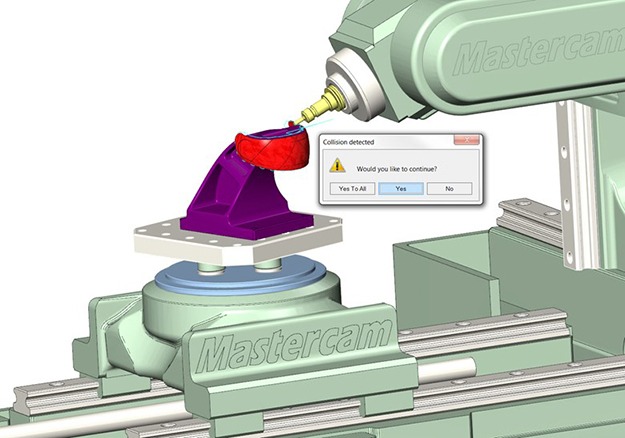
Teams devote significant time and effort to optimizing programming, reducing tool wear, and keeping machines calibrated. But the truth is that all this work is for nothing if the machine crashes. When something in the machining process goes wrong, the absolute worst place for it to happen is on the machine. CNC machines are – at minimum – several tens of thousands of dollars. They’re investments. If one is to crash due to a cutting tool colliding with it, it is disastrous if not outright ruinous for a shop. The manufacturer will lose machining time and also pay to repair or replace the machine.
A complete machine simulation package pinpoints problems while you program the part in the CAM software. The in-suite Simulation tool in Mastercam CAD/CAM software signals users not only if there is a collision detected, but also if there is a near-miss detected. Then, with just a few clicks, programmers are able to resolve the issues and keep working. When you find mistakes before the part goes to the machine, you only lose time. And even then, the loss is minimal.
La marche suivante
La valeur de la simulation de machine réside dans sa capacité à modéliser avec précision et exactitude un processus d’usinage. Pour cette raison, il est absolument crucial de trouver un système de simulation qui s’interface parfaitement avec la machine CNC que vous avez choisie et votre logiciel de CAO/FAO. Heureusement, le Simulateur Mastercam CAO peut faire exactement cela. Contactez votre revendeur local Mastercam pour en savoir plus.